This used to be a footnote. When the survey ran on a 20-digit code, the rest of the receipt barely mattered — you found the code, typed it, done. Now that the survey identifies your visit from the receipt itself, knowing your way around the printout is the whole game. The good news is that it comes down to two values.
Why the receipt matters more than it used to
The current form has two routes in, and both run through the paper in your hand. Either you photograph it and let the system read it, or you read it yourself and type in the store number and the date and time. There is no third route. No account, no order history lookup, no phone number search. If the receipt is gone or illegible, the survey is closed to you for that visit — which is why we say, repeatedly, keep it.
The two receipt layouts
Checkers and Rally’s print two different receipts, and the survey helpfully shows both.
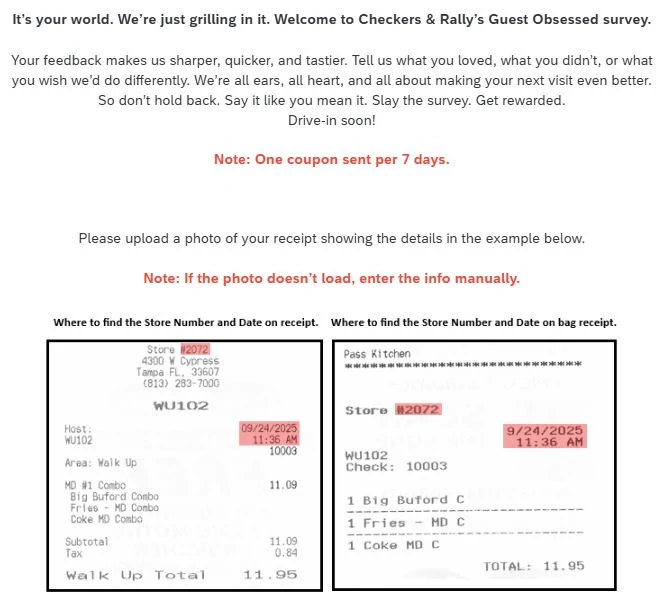
The register receipt is the long one printed at the till or the drive-thru window, with the itemised order, subtotal and tax. The bag receipt is the shorter kitchen-side slip stapled to or dropped in the bag, listing what was made. They carry the same two values, arranged differently.
Finding the store number
On the register receipt, the store number appears in the header block, immediately above the
street address — in the survey’s example, Store #2072 sitting above
4300 W Cypress, Tampa FL, 33607. That address, incidentally, is the company’s own head office,
which is a nice detail: they used their corporate location as the worked example.
On the bag receipt, it is on its own line near the top, printed simply as
Store followed by the number.
Enter the digits only
The survey’s field shows 1234 as the example format. Type
2072, not Store #2072 and not #2072. Including the symbol is one of the
more common reasons the form refuses to advance.
Finding the date and time
On the register receipt, the date and time sit in the right-hand column, level with the host
and area lines — 09/24/2025 above 11:36 AM in the example. On the bag
receipt, they sit to the right of the store number in the same stacked arrangement.
Enter them exactly. The field wants MM/DD/YYYY HH:MM on a twelve-hour clock,
and this is where most rejected submissions come from: an afternoon visit is 02:36 with PM, never
14:36. Match the minutes too. The system is looking for a real transaction, and a five-minute drift
can miss it.
The check number, and whether you need it
Also on both layouts: Check: 10003 in the example, sitting under the host line on the register
receipt and just below the store number on the bag receipt. It identifies your individual order.
The retired POS=Piecemeal entry route asked for it. The current form does not.
We are documenting it here only because guides that still describe the old flow will send you looking, and it is
better to know what you are looking at than to conclude your receipt is defective.
Photographing it so the upload actually works
The upload route is faster when it works, and the difference between working and not is almost entirely about the photograph.
- Flatten it. A curled receipt throws shadows across exactly the lines that matter. Press it under a phone case or against the dashboard for ten seconds first.
- Fill the frame. The receipt should be most of the picture. A tiny receipt in the middle of a café table gives the reader almost nothing to work with.
- No flash. Thermal paper is semi-glossy and flash blows out the print. Use indirect daylight or a lamp off to one side.
- Get the whole top block. Store number, address, date and time all need to be in shot and in focus. The bottom half of the receipt is optional.
- Shoot straight on. A steep angle distorts the characters enough to defeat the reader.
If it still will not read after two attempts, stop fighting it and type the two fields. That is what the fallback is for, and it takes fifteen seconds.
Faded, lost and reprinted receipts
Faded. Thermal receipts fade with heat, light and time, and a receipt that has spent a July week in a car can be unreadable. If you can still make out the store number and the date and time by eye, use manual entry — you do not need the photo to work. If you cannot, that visit is gone.
Lost. There is no recovery route. The survey has no way to find your visit without the receipt, and the restaurant will not reprint one for survey purposes. This is the whole argument for taking the survey the same day.
Reprinted or emailed. If you have a digital copy that shows the store number and the timestamp, the manual route will accept those values, since it is just two text fields. Redemption is the harder half — expect to need paper at the window.
A line-by-line anatomy
| Line | Example | Needed for the survey? |
|---|---|---|
| Store number | Store #2072 | Yes — digits only |
| Address block | 4300 W Cypress, Tampa FL | No — useful for confirming the right store |
| Date | 09/24/2025 | Yes |
| Time | 11:36 AM | Yes — 12-hour, to the minute |
| Host / employee ID | WU102 | No |
| Area / order channel | Walk Up | No — but the survey will ask you the same thing |
| Check number | Check: 10003 | Not on the current form |
| Itemised order | MD #1 Combo — Big Buford | No |
| Subtotal, tax, total | 11.09 / 0.84 / 11.95 | No |
| Survey invitation | guestobsessed.com | It is the reason you are here |
| Offer wording | Varies by market | Yes at redemption — read it |
That last row is the one worth a second look. The offer terms — which sandwich, what you have to buy alongside it, how long you have — are printed on your receipt and nowhere else. No survey guide, including this one, can tell you what your particular receipt says. Our free sandwich page explains how to read that wording.
Questions about receipts
Where is the store number on a Rally’s receipt?
Near the top, usually on its own line reading Store # followed by the number, or printed immediately above the street address. On a bag receipt it is generally the first thing under the header. The survey wants the digits only — enter 2072, not Store #2072.
What is the check number on a Checkers receipt?
The transaction number for your specific order, printed as Check: followed by four or five digits — 10003 in the survey’s own worked example. The old survey platform used it as part of the manual-entry route. The current form does not ask for it, but there is no harm in knowing where it sits.
My receipt is faded. Can I still take the survey?
If you can read the store number and the date and time, yes — use manual entry rather than the photo upload. If those have faded past legibility, the receipt is unfortunately spent. Thermal paper fades fastest in heat and sunlight, so a receipt left on a dashboard can become unusable within days.
Can I use a photo of a receipt instead of the paper one?
For taking the survey, yes — the form is asking for a photo anyway. For redeeming the coupon at the restaurant, expect to need the paper. Staff are looking for a physical receipt with the offer printed on it and, where applicable, a handwritten validation code.
Does a delivery or app order receipt work?
It depends whether it carries a store number and a timestamp from the restaurant rather than from the delivery platform. Third-party app receipts frequently do not, and the survey invitation is often absent from them entirely. An in-store or drive-thru receipt is the reliable one.

We are an independent team that documents restaurant guest-satisfaction surveys. We are not Checkers, Rally’s, or the company that runs GuestObsessed.com. We take the surveys ourselves, screenshot what we see, date every claim, and correct pages when the survey changes. Read our editorial policy or tell us we got something wrong.