Most people arrive at this page after the survey did not behave the way a guide told them it would. So let us deal with that first: the GuestObsessed survey no longer asks for a 20-digit code. It asks for a photograph of your receipt. If you have been hunting for a code that is not printed anywhere, you have not misread your receipt — you have read an out-of-date instruction.
What follows is the current flow, screen by screen. Our main survey guide covers the same ground in seven steps with the surrounding context; this page is the close-up.
Before you open the survey
Two minutes of preparation saves the whole exercise. Have the receipt in your hand, not in the car. Check that the top block — store number, address, date and time — is still legible; thermal paper that has been in a hot vehicle for a week frequently is not. Turn off any VPN or aggressive ad blocker, because the survey redirects to a Qualtrics domain and some blockers treat that redirect as suspicious.
If you are unsure which numbers on the receipt matter, our receipt guide marks them on both the register and bag layouts.
Screen one: the welcome page
Go to guestobsessed.com. Not an .aspx address, not a POS= link
— the short domain. It forwards you to the live form.
The welcome screen opens with the brand’s own copy: “It’s your world. We’re just grilling in it. Welcome to Checkers & Rally’s Guest Obsessed survey.” It invites you to say what you loved and what you didn’t. Then, in red, it prints the single most useful sentence on the whole site:
Printed on the survey itself
“Note: One coupon sent per 7 days.”
That is your answer on frequency, straight from the source — not from a survey blog guessing at “one per visit”.
Below that, the screen tells you what it wants: “Please upload a photo of your receipt showing the details in the example below”, followed by “Note: If the photo doesn’t load, enter the info manually.” And then — helpfully — it shows you two annotated receipts.
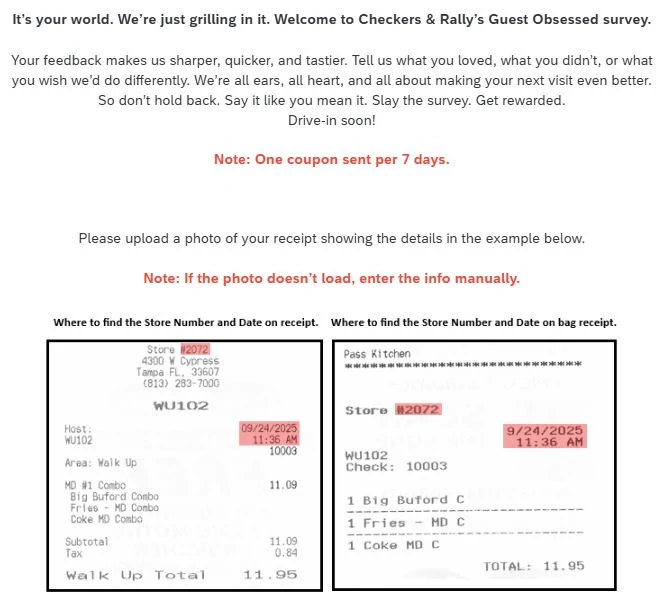
Study those two diagrams for a moment, because they answer the question people search for most. On the register receipt, the store number sits in the header block just above the address, and the date and time sit in the right-hand column beside the host line. On the bag receipt, the store number is on its own line near the top and the date and time sit to the right of it. Same two values, different positions.
Screen two: identifying your visit
This is where the survey used to ask for a code, and where it now asks for something else entirely.
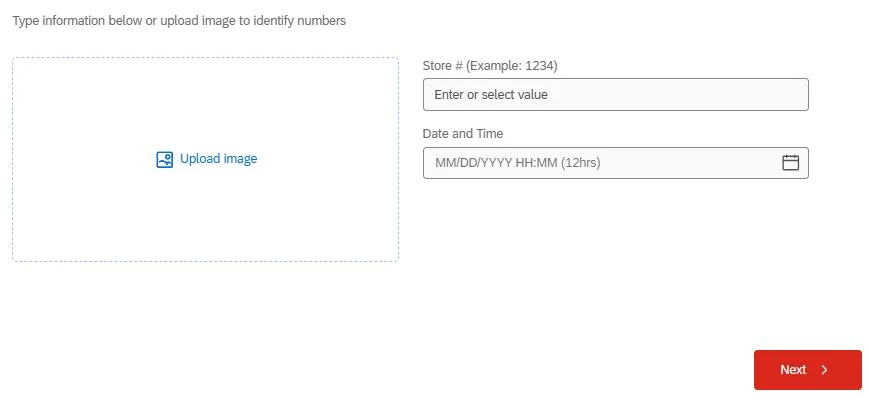
You have two routes and they are equally valid.
Route A — upload the receipt photo
Tap the dashed Upload image box and either take a photo or pick one from your camera roll. For the best chance of it reading cleanly: lay the receipt flat, avoid shadows falling across the top block, fill the frame with the receipt rather than the table, and do not use flash on glossy thermal paper — it blows out the print. If the upload is accepted, the fields on the right fill themselves in.
Route B — type two fields
If the photo will not read, or you would simply rather type, the right-hand side takes over:
1234 as the example, so it wants the plain number
— four digits in most cases. Do not include the # symbol or the word “Store”.MM/DD/YYYY HH:MM (12hrs).
A twelve-hour clock, matched to the minute against your receipt. This is the field that rejects people.Then press the red Next button. If it refuses to advance, the fix is nearly always the time format — see troubleshooting.
Screen three: the questions
From here it is a normal satisfaction questionnaire. You will be asked to rate the visit overall and then break it down: food quality and temperature, order accuracy, speed of service, staff friendliness, cleanliness and value for money. There will be a question about how you ordered — drive-thru, walk-up window, delivery, app — and a likelihood-to-recommend question.
The form branches. Rate something poorly and it will ask a follow-up about what went wrong; rate everything top marks and it will move along quickly. Near the end there is an open comment box. Use it. That box is the part a real person reads, and it is where a specific complaint (or a specific compliment about a member of staff) does the most work. Our page on the question set walks through every section.
Screen four: your reward
When you submit, read the final screen properly before you touch anything.
The older version of this survey finished by displaying a validation code to write on your receipt. The current welcome screen’s phrasing — “one coupon sent” — points instead at the coupon being delivered to you. We are telling you both possibilities rather than picking the tidier one, because the honest position is that this depends on the version and the market you are in.
Do this before you close the tab
If a code appears on screen, write it on the receipt and screenshot it. It is generally not recoverable once the tab is gone, and there is no “resend” button. If the screen says a coupon is on its way, note where it is going.
After the survey
Keep the receipt. Whether you were given a code to write on it or a coupon to carry, the receipt is what you hand over at the window, and the offer terms are printed on it. Then read how to redeem the coupon, which covers the purchase requirement, the expiry window and what to do at a franchise that hesitates.
Doing it on a phone
Recommended, for one reason: you photograph the receipt with the device you are already answering on. Beyond that, three small things help. Use the browser rather than an in-app browser inside a social app, because those sometimes mangle file uploads. Keep the phone off battery-saver, which can throttle the camera. And if the page stalls on the redirect, disable the VPN before you start blaming the survey.
Six mistakes that waste a receipt
| Mistake | What happens | Fix |
|---|---|---|
| Using a 24-hour time | The date field refuses the entry | Convert to 12-hour and set AM/PM |
Typing #2072 in Store # | Field rejects the symbol | Enter the digits only |
| Binning the receipt after submitting | Nothing to redeem against | Keep it until the coupon is used |
| Closing the tab on the code screen | Code is unrecoverable | Write it down, then screenshot it |
| Photographing a faded receipt | Upload will not read | Switch to manual entry |
Following an .aspx link | 404 error page | Use the plain guestobsessed.com address |
Common questions
Do I need the survey code to take the GuestObsessed survey?
No. The current form does not ask for one. It asks for a photo of your receipt, and if that fails it asks for the store number and the date and time. If your receipt does print a long numeric code, keep it — it costs nothing — but you will not be asked to type it on the screens we have seen. The survey code page explains why.
What format does the date and time field want?
MM/DD/YYYY HH:MM on a 12-hour clock. That last part causes more failed submissions than anything else. A visit at 2:36 in the afternoon is 02:36 with PM selected, not 14:36. Match the time printed on the receipt exactly, to the minute.
Can I take the survey days after my visit?
Usually, within the window printed on your receipt — but do not test it. Thermal receipt paper fades, and a receipt you cannot photograph or read is a receipt you cannot use. Take the survey the same day or the next one and the question never comes up.
Will the survey work on my phone?
Yes, and a phone is the better choice. The form is responsive, and photographing the receipt with the same device you are answering on removes the whole business of transferring a file. Turn off any VPN first — that is a common cause of the page refusing to load.
Does the survey cost anything?
No. It is free, there is nothing to install, and you are never asked for a card number. If you land somewhere that wants payment or a download, you are not on guestobsessed.com — close it.

We are an independent team that documents restaurant guest-satisfaction surveys. We are not Checkers, Rally’s, or the company that runs GuestObsessed.com. We take the surveys ourselves, screenshot what we see, date every claim, and correct pages when the survey changes. Read our editorial policy or tell us we got something wrong.